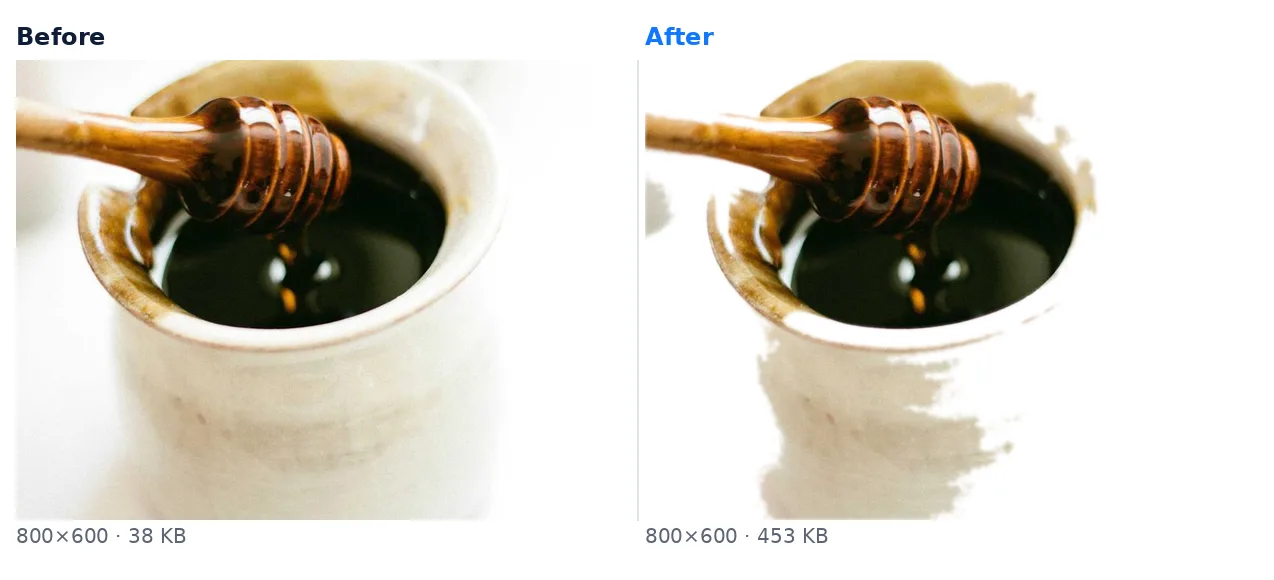
Works best on photos and graphics with a solid, even background — for example a product shot on a white wall. Busy or multi-coloured backgrounds will not be removed cleanly. Small enclosed gaps left inside your subject are filled in automatically.
🔒 Processed in your browser. Nothing is uploaded. The result is a PNG with a transparent background.
This free background remover takes the solid background out of a photo and leaves you with a transparent PNG, ready to place on any colour, design or slide. It works entirely in your browser: nothing is uploaded, nothing is sent to a server, and your picture stays on your own device.
Example result: a product photo on a plain white background — the background removed, the product kept.
It works by finding the background colour at the corners of your picture and removing the connected area of similar colour, starting from the edges and working inwards. Small enclosed areas inside the subject are filled back in, and tiny stray dots are cleaned up. That is why it works best on photos with a plain, even background — a product on a white wall, a logo on a solid colour, or a portrait against a plain backdrop.
Removes solid backgrounds in your browser
Transparent PNG output
Tolerance and edge-smoothing controls
Click the picture to pick the background colour
No upload — private by design
Try a sample image — no upload needed.
How to use the Background Remover
Upload your JPG, PNG or WebP image — or press “Try Sample Image” to try it with a sample photo, no upload needed.
Check the background colour shown — it is taken from the corners. If it picked the wrong colour, click that colour in the picture instead.
Adjust the tolerance if too much or too little was removed, set the edge smoothing, then press Remove background and download the transparent PNG.
Getting a clean result
If the background is not fully removed, raise the tolerance a little and try again. If parts of your subject disappear, lower the tolerance, or click a background colour further from your subject's colours. Because the picture is processed on your device, you can try different settings as many times as you like without uploading anything.
When to use it
Use it to cut a product out for an online shop listing, to lift a logo off a coloured background for a presentation, to make a profile picture or a sticker, or to place a person or object onto a new background in another editor. After removing the background, the Image Watermark tool can add your name to the result.
Background Remover FAQ
What kind of backgrounds can it remove?
Solid, even backgrounds — a plain wall, a white backdrop or a single colour. Busy, multi-coloured or patterned backgrounds will not be removed cleanly, because there is no single background colour to remove.
Is the Background Remover free?
Yes. It is free to use, with no signup and no usage limits.
What format is the result?
A PNG with a transparent background, so you can place it on any colour or design. JPG cannot hold transparency, which is why the result is always a PNG.
Are my files or data uploaded?
No. Everything runs in your browser, so your files and details stay on your device.